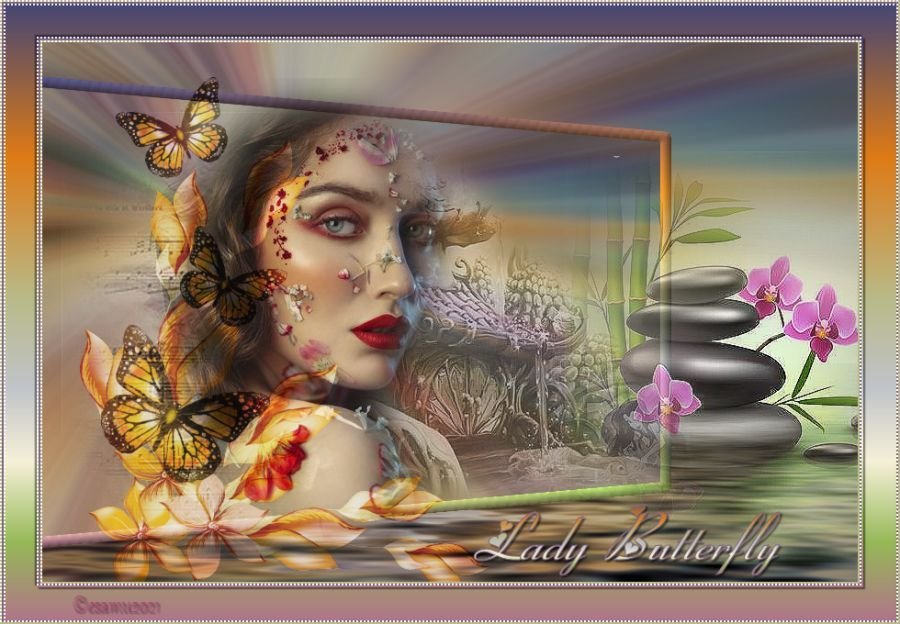
Lady Butterfly.
This Lesson is copyrighted to the Tut Writer, © esamu2021
This Lesson may not be forwarded shared or otherwise placed
on any Web Site without written permission from ©Esamu
This tutorial was created in Corel X6 Version, but can also made in the other Versions.
Supplies
66062-butterfly-and-flower-butterlies.png
deco.png
lotus.png
japanese.png
ladyface.pspimage
musik.pspimage
jap.gradient
ladybutterfly.png
Open your images
Duplicate and close originals
Save the gradient in to My PSP Gradient Folder

Plugins
Flamingpear-Flood
AFS IMPORT-sqborder2
Simple
Matterials
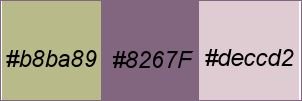
Step 1
File-New Open New File 900x600 pixel Raster
Change Foreground to Gradient
Layers-New Layer
Flood Fill Tool-flood fill with Gradient
Selections-Select All
Maximize the japanese.png image
Edit-Copy -Edit -Paste Into Selection
Selections-Select None.
Layers-Merge Down
Effects-Image Effects-Seamless Tiling

Adjust-Blur-Radial Blur
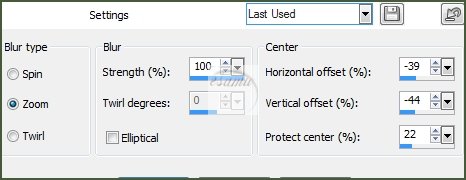
Layers-Duplicate
Copy of Raster Layer is aktiv
Image-Resize---resize 89% All layers not checked
Effects-3D Effects-Geometric-Effects-Perspective-Horizontal
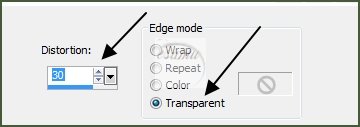
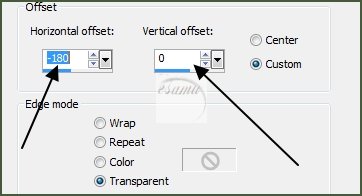
Effects-Image -Effects-Offset
Step.2
Stay on Copy of Raster Layer
Selections-Select All
Float-Defloat
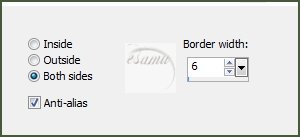
Modify-Selection Select Borders
Layers-New Raster Layer
Flood Fill Tool flood fill with Gradient
Keep selected
Effects-3D Effects-Inner Bevel

Selections- None
Layers-Merge Down
Step.3
Close the Copy of Raster
Highlight the Raster1
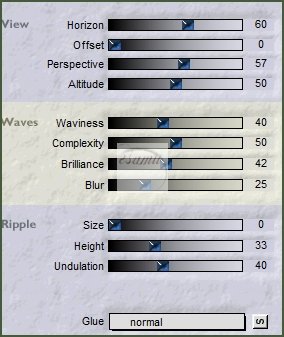
Effects / plugins-Flamingpear-Flood
Maximize the lotus.png image
Edit-Copy-Edit -Paste As New Layer
Effects-Image Effects-Offset

Effects-3D Effects-Edge Effects-Enhance
Open and highlight Copy of Raster1
Maximize the japanese.png image
Edit-Copy -Paste As New Layer
LayerPropertias-Luminance... Opacity 59%
Effects-Edge-Effects-Enhance
Maximize the musik.pspimage
Edit-Copy-Paste As New Layer
Image -Resize 68% All layers not checked
Effects-Image -Offset

Effects-Edge-Effects-Enhance
LayerPropertias-Luminance... Opacity 68%
Maximize the ladyface.pspimage
Edit-Copy-Paste As New Layer
Image-Mirror
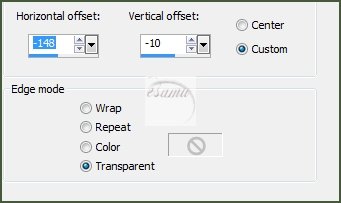
Image-Effects-Offset

Maximize the 66062-butterfly and flower.png image
Image-Resize-60%
Effects-Edge-Effects-Enhance
Payers-Properties-Soft Light
Opacity 69%
Layers-Merge All(Flatten)
Layers-New Layer
Selection Sellect All
Flood Fill Tool-flood with Gradient
Modify-Contract-2
Edit-Cut
Flood Fill Tool-flood with Background
Modify-Contract-2
Edit-Cut
Flood Fill Tool-flood with Foreground
Modify-Contract-2
Edit-Cut
Selections-Invert
Effects-Plugins Filters Unlimited-ASF IMPORT-sqbordre2

Selections-Select None
Layers-Merge Down
Selections-Select All
Image-Add Borders
Add Border 40 pix White
Selections-Invert
Layers-New Layer
Flood Fill Tool-flood with Gradient
Selections-Invert
Effects-3D Effects-Drop Shadow

Repeat V-H ..-2
Selections-Select All
Layers-New Layer
Flood Fill Tool-flood with Foreground
Modify-Contract-2
Edit-Cut
Flood Fill Tool-flood with Background
Modify-Contract-2
Edit-Cut
Flood Fill Tool-flood with Gradient
Modify-Contract-2
Edit-Cut
Selections-Invert
Effects-Plugins Filters Unlimited-ASF IMPORT-sqbordre2
Same settings
Select None
Maximize th e deco.png image
Edit-Copy-Paste As New Layer
Move it up to the left corner of image
Effects-Plugins-Simple-Top Left Mirror
Maximize the butterfly.pmg image
Edit-Copy-Paste As New Layer
Move it down to the right corner of image
Drop Shadow
V-H...2
Add your watermark
Merge All(Flatten)
Image-Resize
Resize Width 900 pixel
File-Export-JEPG Optimizer .Compression 20
© Etelka 2022
All Rights Reserved
Designed and Maintained by Etelka
|
|
|
|